Last updated on 2025-11-23T20:16:21+08:00
1. TODO
2. 脑图
Xmind
Edraw
Hexo 地址
👉 http://blog.wangjia.ink/2025/11/12/源码:java.lang.Thread源码解析/
3. 基础部分
3.1. Thread 概述
Thread 是一个具体类,实现了 java.util.concurrent.Runnable
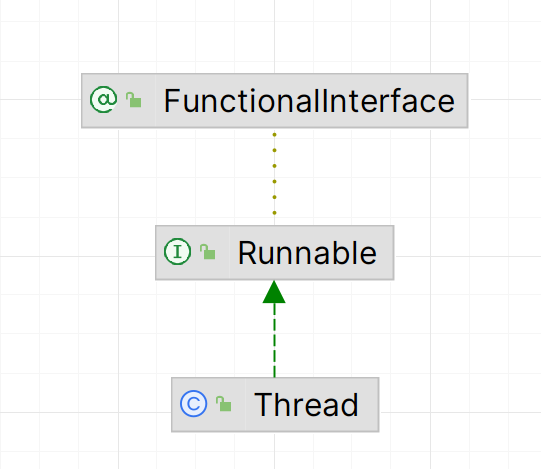
Thread 实例是一个 Runnable 任务,当我们调用 Thread#start 后,JVM 会在操作系统层面请求创建一个本地线程。一旦操作系统创建了这个本地线程,并将其与 Thread 实例 “绑定”,Thread 实例就会进入可运行状态。当本地线程被分配到 CPU 时间片后,开始执行 Java 代码,执行的就是 Thread#run
然而,由于 Thread#run 的源码又是:
1
2
3
4
5
6
7
| public void run() {
if (target != null) {
target.run();
}
}
|
所以线程执行的流程大致为:本地线程 ➔ Thread#run ➔ target#run
[!NOTE] 注意事项
- 详见源码:
Runnable
obsidian 内部链接:
- 源码:java.util.concurrent.Runnable源码解析
Hexo 链接:
- http://blog.wangjia.ink/2025/09/02/%E6%BA%90%E7%A0%81%EF%BC%9Ajava.util.concurrent.Runnable%E6%BA%90%E7%A0%81%E8%A7%A3%E6%9E%90/
- 虽然线程执行的流程大致为:
本地线程 ➔ Thread#run ➔ target#run。但是在某些场景下,我们不希望在创建 Thread 实例时传入一个 Runnable 实例,因为我们已经明确知道该线程要执行的具体逻辑。此时,常见的做法是直接继承 Thread 具体类,并重写 Thread#run,我们直接使用这个 Thread 具体类的子类。这样线程执行的流程大致为:本地线程 ➔ Thread#run
1
2
3
4
5
6
7
8
9
10
11
12
13
14
15
16
17
18
| public class MyThread extends Thread{
@Override
public void run() {
...
}
}
public class Test {
public static void main(String[] args) {
Thread myThread = new MyThread();
myThread.start();
}
}
|
3.2. 创建 Thread 实例常见方式
3.2.1. 继承 Thread 具体类,重写 Thread#run,创建 Thread 具体类的子类实例
正如我们上面讨论的,直接继承 Thread 类,重写 Thread#run,创建 Thread 具体类的子类实例
1
2
3
4
5
6
7
8
9
10
11
12
13
14
15
16
17
18
| public class MyThread extends Thread{
@Override
public void run() {
...
}
}
public class Test {
public static void main(String[] args) {
Thread myThread = new MyThread();
myThread.start();
}
}
|
[!NOTE] 注意事项
- 我们可以使用匿名内部类继承
Thread 具体类:
1
2
3
4
5
6
7
8
9
10
11
12
13
| public class Test {
public static void main(String[] args) {
Thread myThread = new Thread("myThread") {
@Override
public void run() {
...
}
};
myThread.start();
}
}
|
3.2.2. 创建 Runnable 实例,创建 Thread 实例,并将 Runnable 实例作为 Thread 实例的构造方法参数传递进去
1
2
3
4
5
6
7
8
9
10
11
12
13
14
| public class Test {
public static void main(String[] args) {
Runnable runnable = new Runnable() {
@Override
public void run() {
....
}
};
Thread myThread = new Thread(runnable, "myThread");
myThread.start();
}
}
|
3.2.3. 使用线程池
详见笔记:JUC
obsidian 内部链接
- 笔记:JUC
Hexo 链接
- http://blog.wangjia.ink/2025/11/23/笔记:JUC/
4. 构造方法
4.1. Thread(String name)
1
2
3
4
5
| public Thread(String name) {
this(null, null, name, 0);
}
|
4.2. Thread(Runnable target)
1
2
3
4
5
| public Thread(Runnable target) {
this(null, target, "Thread-" + nextThreadNum(), 0);
}
|
4.3. Thread(Runnable target, String name)
1
2
3
4
5
| public Thread(Runnable target, String name) {
this(null, target, name, 0);
}
|
4.4. Thread(ThreadGroup group, Runnable target, String name, long stackSize)
1
2
3
4
5
6
| public Thread(ThreadGroup group, Runnable target, String name,
long stackSize) {
this(group, target, name, stackSize, null, true);
}
|
[!NOTE] 注意事项
ThreadGroup 是一个非常古老且很少被正确使用的功能,在现代开发中几乎永远不会碰它
5. 实例方法
5.1. 实例具体方法
5.1.1. 具体方法(普通)
5.1.1.1. void start()
该方法用于非阻塞启动一个 Thread 实例
当我们调用 Thread#start 后,JVM 会在操作系统层面请求创建一个本地线程。一旦操作系统创建了这个本地线程,并将其与 Thread 实例 “绑定”,Thread 实例就会进入可运行状态
当本地线程被分配到 CPU 时间片后,开始执行 Java 代码,执行的就是 Thread#run
1
2
3
4
5
6
7
8
9
10
11
12
13
14
15
16
17
18
19
20
21
22
23
24
25
26
27
28
29
30
31
32
33
34
35
36
37
38
39
40
41
42
43
44
45
46
47
48
49
50
51
52
|
public synchronized void start() {
if (threadStatus != 0)
throw new IllegalThreadStateException();
group.add(this);
boolean started = false;
try {
start0();
started = true;
} finally {
try {
if (!started) {
group.threadStartFailed(this);
}
} catch (Throwable ignore) {
}
}
}
|
5.1.1.2. void interrupt()
1
2
3
4
5
6
7
8
9
10
11
12
13
14
15
16
17
18
19
20
21
22
23
24
25
26
27
28
29
|
public void interrupt() {
if (this != Thread.currentThread()) {
checkAccess();
synchronized (blockerLock) {
Interruptible b = blocker;
if (b != null) {
interrupted = true;
interrupt0();
b.interrupt(this);
return;
}
}
}
interrupted = true;
interrupt0();
}
|
5.1.1.3. void setPriority(int newPriority)
1
2
3
4
5
6
7
8
9
10
11
12
13
14
15
16
17
18
19
20
|
public final void setPriority(int newPriority) {
ThreadGroup g;
checkAccess();
if (newPriority > MAX_PRIORITY || newPriority < MIN_PRIORITY) {
throw new IllegalArgumentException();
}
if((g = getThreadGroup()) != null) {
if (newPriority > g.getMaxPriority()) {
newPriority = g.getMaxPriority();
}
setPriority0(priority = newPriority);
}
}
|
5.1.1.4. int getPriority()
1
2
3
4
5
6
|
public final int getPriority() {
return priority;
}
|
5.1.1.5. void join()
1
2
3
4
5
6
7
8
|
public final void join() throws InterruptedException {
join(0);
}
|
5.1.1.6. void join(final long millis)
1
2
3
4
5
6
7
8
9
10
11
12
13
14
15
16
17
18
19
20
21
22
23
24
|
public final synchronized void join(final long millis)
throws InterruptedException {
if (millis > 0) {
if (isAlive()) {
final long startTime = System.nanoTime();
long delay = millis;
do {
wait(delay);
} while (isAlive() && (delay = millis -
TimeUnit.NANOSECONDS.toMillis(System.nanoTime() - startTime)) > 0);
}
} else if (millis == 0) {
while (isAlive()) {
wait(0);
}
} else {
throw new IllegalArgumentException("timeout value is negative");
}
}
|
[!NOTE] 注意事项
- 推荐使用
TimeUnit#timedJoin 替代该方法,因为其可读性更好
1
| TimeUnit.MINUTES.timedJoin(worker, 1);
|
void join(long millis, int nanos)
1
2
3
4
5
6
7
8
9
10
11
12
13
14
15
16
17
18
19
20
21
|
public final synchronized void join(long millis, int nanos) throws InterruptedException {
if (millis < 0) {
throw new IllegalArgumentException("timeout value is negative");
}
if (nanos < 0 || nanos > 999999) {
throw new IllegalArgumentException(
"nanosecond timeout value out of range");
}
if (nanos > 0 && millis < Long.MAX_VALUE) {
millis++;
}
join(millis);
}
|
5.1.1.7. void setDaemon(boolean on)
1
2
3
4
5
6
7
8
9
10
|
public final void setDaemon(boolean on) {
checkAccess();
if (isAlive()) {
throw new IllegalThreadStateException();
}
daemon = on;
}
|
5.1.1.8. boolean isInterrupted()
1
2
3
4
5
6
7
8
9
10
|
public boolean isInterrupted() {
return interrupted;
}
|
[!NOTE] 注意事项
Thread.interrupted 与 Thread#isInterrupted 的区别在于:Thread.interrupted 会清除 Thread 实例的中断状态,而 Thread#isInterrupted 不会
5.1.1.9. boolean isAlive()
1
2
3
4
5
6
|
public final boolean isAlive() {
return eetop != 0;
}
|
5.1.2. 具体方法(实现)
5.1.2.1. Runnable 中接口方法的实现
5.1.2.1.1. void run()
1
2
3
4
5
6
7
| public void run() {
if (target != null) {
target.run();
}
}
|
6. 静态方法
6.1. 静态具体方法
6.1.1. 具体方法(普通)
6.1.1.1. void sleep(long millis)
1
2
3
4
|
public static native void sleep(long millis) throws InterruptedException;
|
[!NOTE] 注意事项
- 推荐使用
TimeUnit#sleep 替代该方法,因为其可读性更好
1
| TimeUnit.HOURS.sleep(5);
|
6.1.1.2. void yield()
1
2
3
4
5
6
|
public static native void yield();
|
[!NOTE] 注意事项
- 本地线程让出
CPU 时间片后,由于是可运行状态,可能会立即被其他 CPU 核重新调度。因此,在多核处理器或系统负载较低的情况下,该方法的效果可能并不明显。但是在单核环境或系统负载较高时,其调度行为会比较明显
6.1.1.3. Thread currentThread()
1
2
3
|
@IntrinsicCandidate
public static native Thread currentThread();
|
6.1.1.4. boolean interrupted()
1
2
3
4
5
6
7
8
9
10
11
12
13
14
15
16
17
|
public static boolean interrupted() {
Thread t = currentThread();
boolean interrupted = t.interrupted;
if (interrupted) {
t.interrupted = false;
clearInterruptEvent();
}
return interrupted;
}
|
[!NOTE] 注意事项
Thread.interrupted 与 Thread#isInterrupted 的区别在于:Thread.interrupted 会清除 Thread 实例的中断状态,而 Thread#isInterrupted 不会